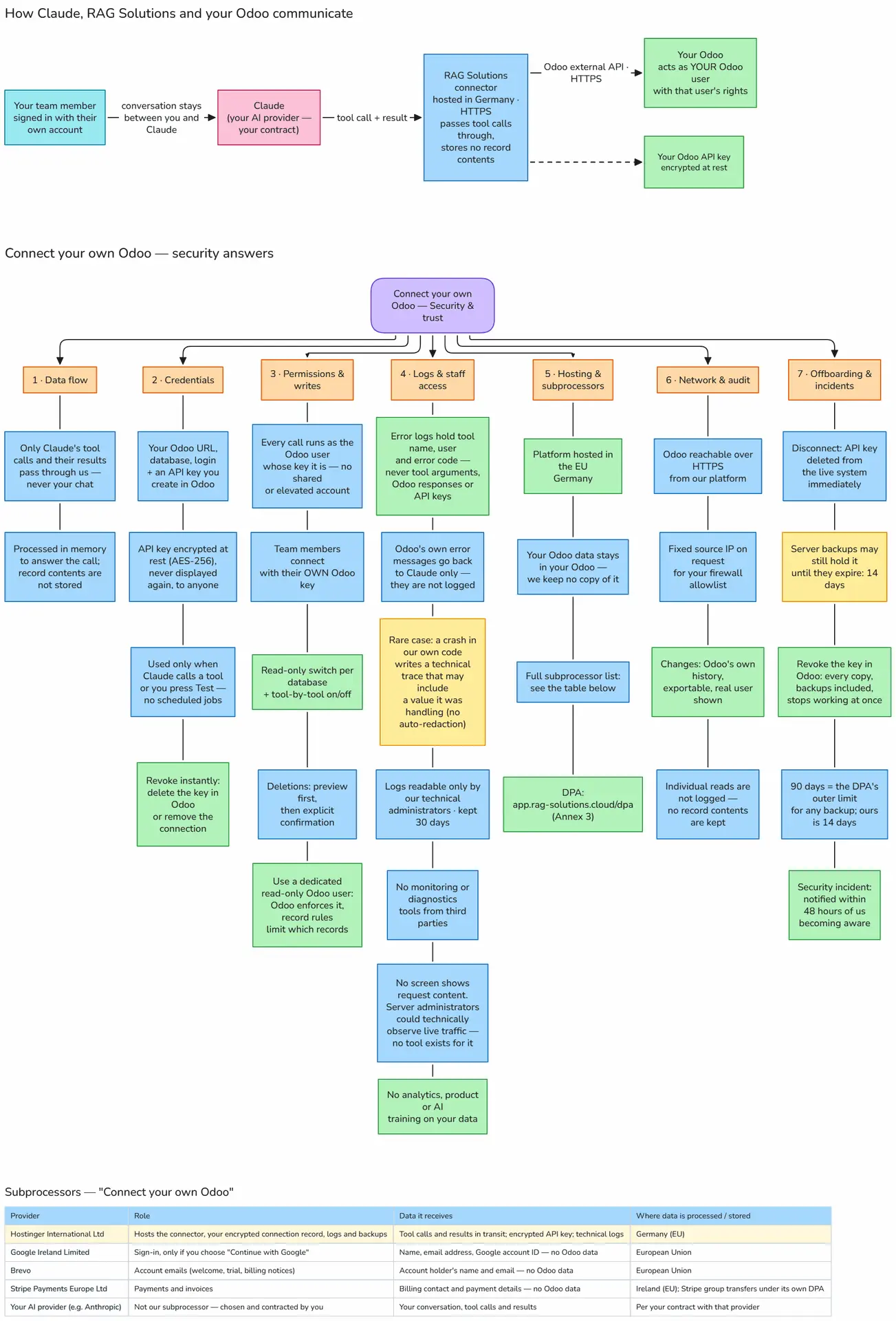
13/11/2026 update – Security and Data Access Improvements
We've improved our Odoo Connector to make accessing your business data through AI assistants such as Claude more secure, efficient, and reliable.
These improvements give you greater control over what your AI assistant can access, protect your Odoo data, and make it easier to work with large amounts of information.
1. Enhanced Read-Only Protection
Your AI assistant can only perform actions that you explicitly allow.
When an Odoo database is configured as Read only in the Tools panel, the connector enforces this restriction at the connection level.
This means your AI assistant can retrieve and analyze information without being able to modify business records.
What does this mean for you?
- Safe data exploration: Ask questions about customers, sales, invoices, products, or other business information without risking accidental changes.
- Protection against modifications: The connector blocks operations that attempt to create, update, or delete records on read-only connections.
- Centralized control: Manage read-only access directly from the Tools panel.
- Additional security: Restrictions are enforced by the connector, not just communicated to the AI assistant.
Example
You can ask Claude:
"Show me all unpaid customer invoices from this month and summarize the outstanding amounts."
Claude can retrieve and analyze the relevant information, but it cannot modify those invoices when the database is configured as read-only.
2. Stronger Multi-Company Access Controls
If your Odoo environment contains multiple companies, you can control which companies your AI assistant is authorized to work with.
The connector now applies these restrictions consistently, including when the AI assistant performs advanced database queries.
What does this mean for you?
- Your AI assistant operates within the companies configured in Companies Claude works in.
- Requests cannot override the connector's configured company restrictions.
- Access to information remains subject to your Odoo permissions and configured company scope.
Example
Your Odoo environment contains three companies:
- Company A – France
- Company B – Germany
- Company C – Spain
If Claude is configured to work only with Company A, its requests cannot expand the connector's authorized company scope to include Companies B or C.
This is especially useful for organizations managing multiple legal entities or business units.
3. Improved Access to Large Datasets
We've improved how the connector retrieves large amounts of data from Odoo.
Previously, individual search requests were limited to a maximum of 500 records, without a way to continue beyond that limit using the same tool.
The connector now supports pagination, allowing the AI assistant to retrieve additional records in successive requests.
What does this mean for you?
- Access more records: Work with datasets containing thousands of customers, orders, invoices, or products.
- Retrieve data in batches: Large datasets can be accessed across multiple requests.
- More reliable results: The connector identifies whether additional matching records are available.
- Better performance: Requests return manageable amounts of information rather than excessively large responses.
Example
You ask Claude:
"Analyze all sales orders from this year and identify our top 20 customers by revenue."
If the result contains more records than can fit into one response, Claude can retrieve additional batches to continue the analysis.
4. More Efficient Data Responses
We've optimized how Odoo data is returned to AI assistants.
The connector now uses a more compact response format to reduce unnecessary information while preserving useful business data.
Key improvements
- Records are returned in a compact format.
- Empty values can be omitted automatically when no specific fields are requested.
- Meaningful values, including False, are preserved.
- Large responses are limited to manageable sizes.
Why this matters
More compact responses can help:
- Reduce AI context and token consumption.
- Make large data retrieval more efficient.
- Avoid unnecessarily long responses.
- Improve the amount of useful information that can be processed per request.
These changes happen automatically. No additional configuration is required.
5. Safer Handling of Odoo Record Information
Odoo records can contain user-entered text, including customer names, lead names, and other descriptions.
We've strengthened how these values are displayed during AI-assisted operations to prevent specially formatted record names from being mistaken for instructions or confirmation information.
What does this mean for you?
- Record names are safely formatted in operation previews.
- Unexpected formatting cannot create additional fake preview entries.
- The connector keeps business data separate from operational instructions.
This adds another layer of protection when working with information that may have been entered by external users or imported from other systems.
6. Improved Reliability and Error Handling
We've also improved how the connector responds to invalid or unusually large requests.
Instead of causing unexpected server errors, malformed requests receive clearer error responses.
The connector also rejects oversized requests before fully processing them.
These improvements make the connection more predictable and resilient during normal usage.
How to Use These Improvements
The improvements are designed to work automatically with your existing Odoo connection once the updated connector is available in your environment.
To review your access configuration:
- Open the Tools panel.
- Select your Odoo connection.
- Enable Read only if you want your AI assistant to retrieve information without modifying records.
- Review Companies Claude works in to control the companies the assistant can access.
- Save your configuration.
You can then continue using Claude to search, summarize, and analyze your Odoo business data.
Frequently Asked Questions
Can Claude modify my Odoo data when Read only is enabled?
No. The connector blocks write operations on connections configured as read-only.
Can Claude access companies outside my configured company scope?
The connector prevents requests from expanding beyond the configured company scope. Your existing Odoo access permissions continue to apply.
Can I analyze more than 500 records?
Yes. Pagination allows the connector to retrieve additional batches of records beyond the previous single-request limit.
Do I need to change my prompts?
No. These improvements work at the connector level. You can continue asking questions in natural language.
Will these improvements reduce AI token usage?
The optimized response format reduces unnecessary data, which can lower token consumption, especially when retrieving many records. Actual savings depend on the type and amount of data requested.
Are these improvements available on every Odoo connection?
These improvements apply to the updated own-Odoo connector. Availability depends on which connector deployment your environment uses.
Summary
With these improvements, the Odoo Connector offers:
- Stronger security through enforced read-only access.
- Better data isolation for multi-company environments.
- Larger data retrieval through pagination.
- More efficient AI interactions with compact data responses.
- Safer operations through improved record formatting and request validation.
Our goal is to help you work with your Odoo data through AI assistants while maintaining control over business access and operations.

 and then Add to Home Screen.
