Your shop keys, locked down
Since you can now connect your WooCommerce and Shopify stores to RAG Solutions, alongside your Odoo, our platform looks after more of your keys than ever. Those keys open your catalogue, your orders and your customers' details. We treat them that way.
This month we ran a full security review of every step a key goes through, from the moment you paste it in to the moment your assistant uses it, and we strengthened several of them. Here is what protects you today.
How your keys are protected
1. You enter a key once, and it is never shown again
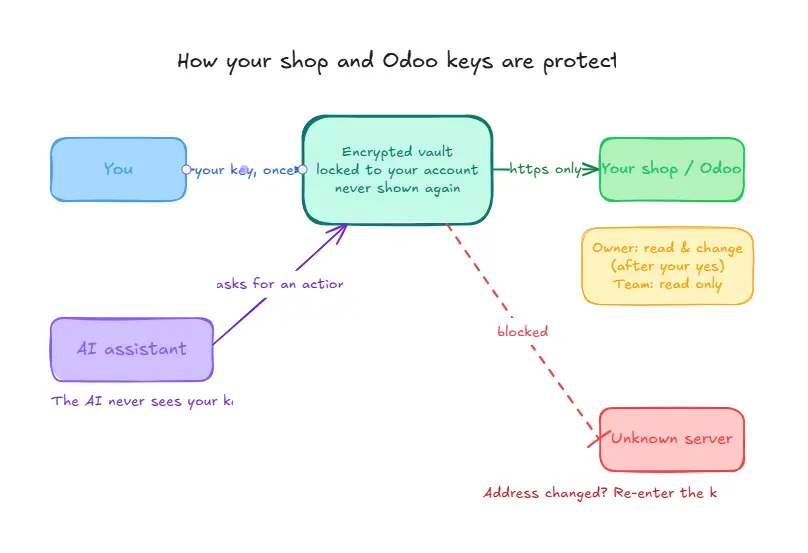
Key fields are write-only. Once saved, a key is never displayed back to you or to anyone else, and it never appears in a web address. To replace one, you simply type a new one.
2. Every key is encrypted and locked to your account
Keys are stored encrypted with an industry-standard authenticated cipher. Each one is also locked to the account and the connection it belongs to: an encrypted key copied anywhere else simply does not open. Even someone able to tamper with the stored data could not make your assistant use another customer's shop, or theirs use yours.
3. A key only ever goes to the address you gave it for
Your saved keys are only sent to the shop or Odoo address you registered them for, and only over an encrypted https connection. If the address of a connection is changed to a different site, the saved key is not carried over: it must be typed again. So even someone who got into your session could not quietly redirect your keys to a server of their own.
Our connections also refuse private and internal network addresses, so a shop address cannot be used to reach anything behind our walls.
4. The AI never sees your keys
Your assistant asks for an action ("list today's orders", "update this price"). Our connector carries it out with your key and returns only the result. The key itself never reaches the AI model, its conversation or its history.
5. Changes happen only when you say yes
Before your assistant changes anything, it tells you exactly what will change and waits for your explicit go-ahead. Permanent deletions need an extra confirmation step, and archiving is preferred wherever possible.
6. Your team gets only what it should
- In Odoo, each team member connects with their own Odoo key, so Odoo's own access rights apply to them.
- Your shop has a single key, yours. So team members' assistants can read your shop, but only you, the owner, can let an assistant change prices, stock or orders.
7. The everyday safeguards
Protection against forged requests from other websites, hardened session cookies, and strict browser security policies on every page.
What you can do too
Security works best as a team effort. When you create keys for RAG Solutions:
- WooCommerce: create the key on a dedicated user with the Shop Manager role, and choose Read access unless you want your assistant to make changes.
- Shopify: grant only the access scopes listed in our setup guide, nothing more.
- Odoo: use an API key on a user whose access rights match what the assistant should do.
- If you think a key has been exposed, revoke it in your shop or Odoo and enter a new one with us. The old one stops working right away.
Our commitment
Security is never "done". We review it with every new feature, and we will keep sharing what we improve. Questions about how we protect your data? Write to us, we are happy to go into more detail.

 and then Add to Home Screen.
